
Coffee Machine Care
Keurig with My K Cup Filter: Setup and Fixes
Oct
A Keurig patent document reported that about 2.5 million K-Cup pods were brewed every day in 2009, equivalent to roughly 912.5 million pods over a year at that pace, according to the Keurig history overview. A reusable filter lets you brew your own ground coffee instead of using a prefilled pod for every cup, but a poor fit can turn that simple switch into a mess of grounds, leaks, or a handle that won't close.
The key is to match the filter to the brewer's generation and entrance-needle layout. Then fill it correctly, seat it without force, and keep the reusable basket and brewer clean.
Which My K-Cup Filter Fits Your Keurig
Keurig filter compatibility depends on the brewer family, generation, and needle layout. Match the filter to the exact model number; a similar-looking filter may not seat correctly.
| My K-Cup filter by Keurig brewer family | Filter to use | Fit check |
|---|---|---|
| Classic Series (K15, K50, K55) | Original My K-Cup reusable filter | Match the filter listing to the brewer's model number |
| K-Select, K-Elite, K-Compact | My K-Cup accessory listed for the model | Check the accessory listing against the exact model |
| K-Supreme family | Newly designed My K-Cup Universal Reusable Coffee Filter with five-hole lid | Match the filter version to the brewer generation |
| Keurig 2.0 brewers | Not compatible with the reusable filter | Use pods designed for the brewer |
| Plus Series | Filter may need a dedicated adapter | Check the model listing for adapter requirements |
| Older or refurbished units | Filter listed for the exact model | Compare the model number and needle layout with the filter specifications |
Match the filter to the brewer generation
The original My K-Cup works with Classic Series models such as the K15, K50, and K55. The K-Select, K-Elite, and K-Compact use the My K-Cup accessory listed for the specific model. Filter versions are not interchangeable across every model in these families, so check the name and model number on your brewer before buying.
K-Supreme-family machines require the newly designed My K-Cup Universal Reusable Coffee Filter with a five-hole lid. Earlier filter versions may damage these brewers. Keurig 2.0 brewers are not compatible with this reusable filter, and some Plus Series models require a dedicated adapter.
Practical rule: “Universal” does not mean cross-generational. Match the filter to both the brewer's pod-holder shape and its needle layout.
Check before you buy
Find the exact model number on the brewer and compare it with the filter's compatibility listing. Check whether the model needs an adapter, too. If the filter does not sit flat or the handle will not close, stop and recheck the fit rather than forcing it into place.
How to Fill, Seat and Brew with a Reusable Filter
Use a repeatable routine. The basket needs enough room for water to pass through the coffee bed, and every part in the holder needs to sit correctly before the brew cycle starts.
Power off and fill the reservoir. Turn off the brewer, then fill the reservoir with fresh water to the MAX line. A clean water supply supports the brew path; don't start with a low reservoir and assume the machine will finish the cup normally.
Check the pod holder and funnel. Make sure both parts are installed, since Keurig says they must be in place for brewing. Plus Series owners should confirm whether their model's adapter is installed before checking these parts.
Add the ground coffee. Fill the basket, but keep the grounds below the MAX line. Overfilling can restrict water flow, cause a short brew, or contribute to a clog.
Use a coarse grind. Choose grounds with a texture close to French-press coffee. Very fine grounds can slow the flow and extract unevenly; tamping them down makes the bed denser, so level the coffee gently instead.
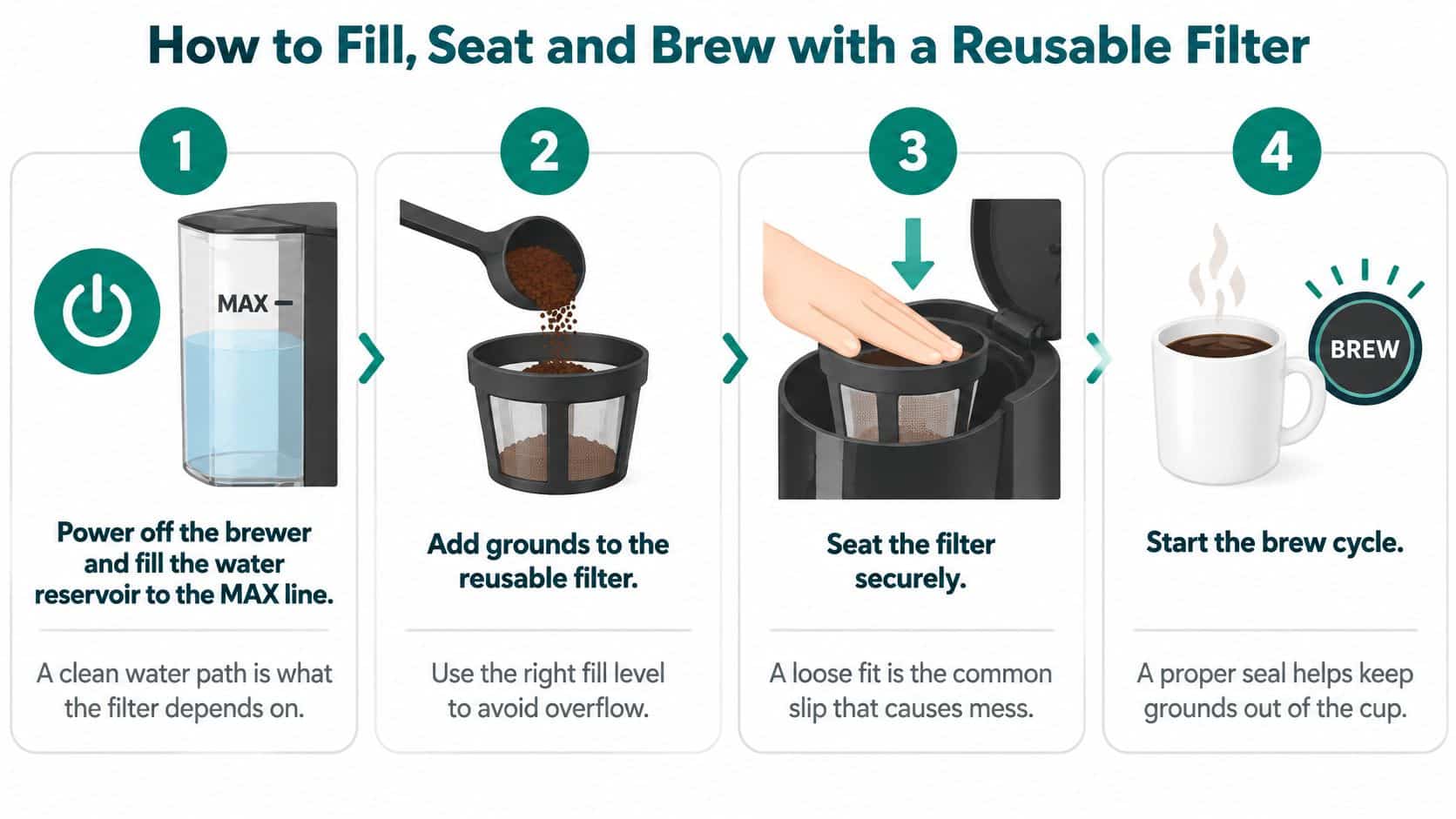
Close the filter and seat it fully. Place the lid on the filter and fit the assembly into the pod holder. The filter should sit evenly; if it tilts or catches, remove it and recheck the model and lid configuration.
Close the handle without forcing it. A handle that won't close is a reason to stop, not push harder. Remove the filter and verify that you have the right version and that it's seated correctly.
Select a cup size and brew. Start the cycle, then empty the spent grounds and rinse the basket as soon as the cup is finished. Quick rinsing removes residue before it dries in the mesh.
A normal brew should have a steady flow, an even colour, and no grounds in the mug. The coffee should taste close to the strength you expect from a standard pod. If the result is watery or the brewer stalls, check the fit and fill level before changing several brewing variables at once.
Why Grounds Escape and How to Stop Them
Grounds in the mug are frustrating, but they don't automatically mean the filter material has failed. On K-Supreme-family machines, the lid must match the entrance-needle layout: Keurig's K-Supreme guidance specifies a compatible filter with five holes in its lid and warns that an already-punctured pod can let grounds escape.
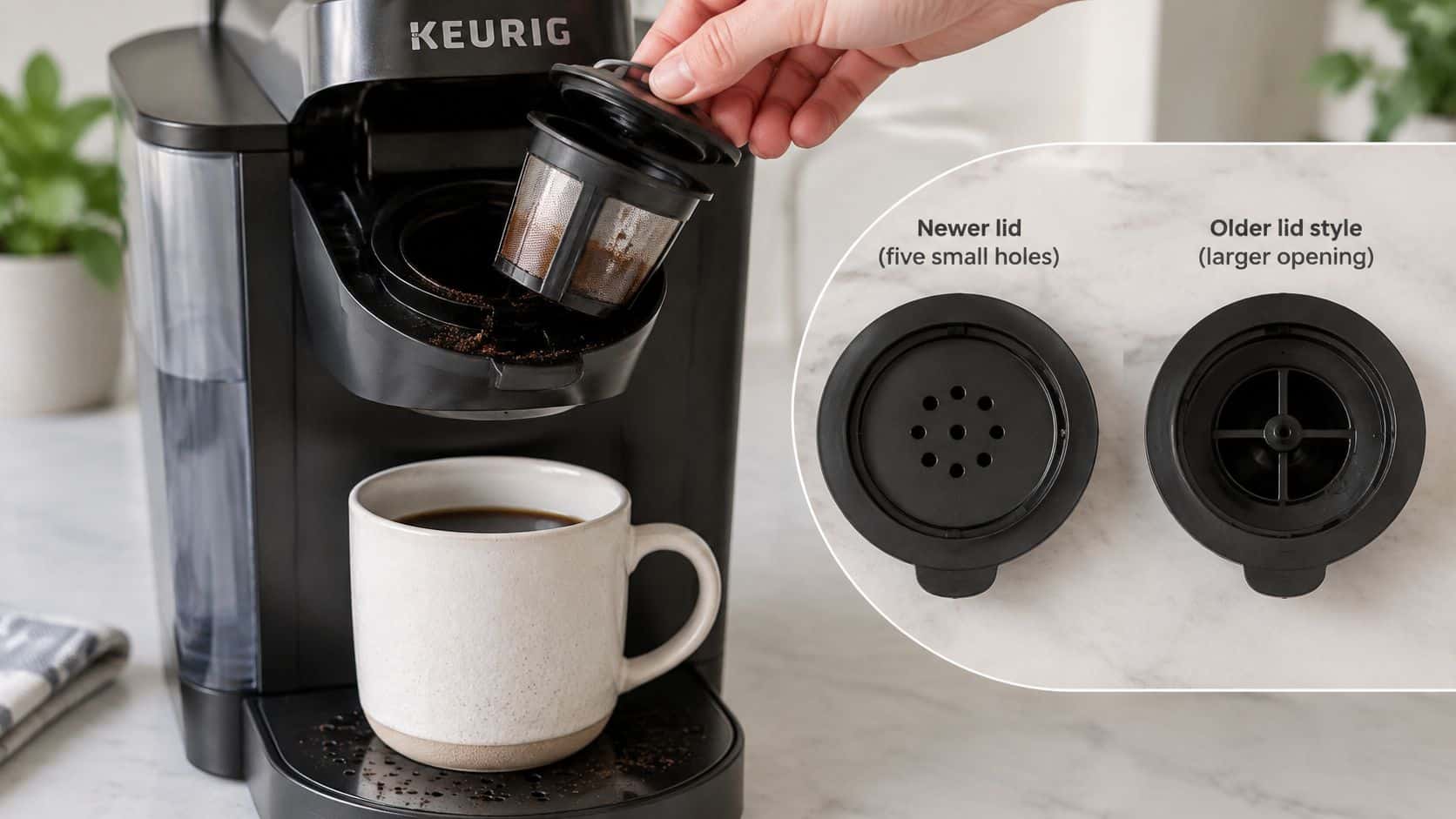
When the filter body doesn't sit correctly in the pod holder, water can flow around the coffee bed instead of through it. A lid with the wrong hole pattern can also fail to align with the brewer's puncture system. Use the correct lid configuration, seat the filter and holder fully, and don't brew with a damaged or previously punctured pod. For help choosing coffee that works well in a reusable basket, see this guide to the best ground coffee for Keurig brewers.
| Reusable filter symptoms, causes and fixes | Likely cause | Fix |
|---|---|---|
| Grounds in the mug | Wrong lid for the brewer or a previously punctured pod | Use the lid that matches your model and avoid punctured pods |
| Weak or watery coffee | Overfilled basket or grind too fine | Keep grounds below the MAX line and grind coarser |
| Short brew or clog | Overfilling with fine grounds | Reduce the fill and switch to a coarse grind |
| Handle won't close | Filter is the wrong version or isn't seated | Confirm the model, reseat the filter fully, and never force the handle |
| Leak at the pod holder | Pod holder or funnel is missing or not installed | Install both parts before brewing |
| Filter won't align on Plus Series | Adapter may be required | Confirm the adapter requirement for your model |
Weak coffee and short brews can have different causes. An overfilled basket leaves less space for water to move through the grounds, while overly fine grounds can restrict the flow. Reduce the fill and use a coarser grind before assuming the brewer itself is faulty.
You can see the main alignment and seating points in the demonstration below.
A leak or sediment problem often traces back to fit and seating, not to the filter material. Check the lid, holder, funnel, and adapter, and confirm that each part belongs with your model. If the lid, holder, or funnel doesn't fit, stop brewing rather than forcing it.
How to Clean the Filter and Keep the Brewer Running
The reusable filter and the brewer need separate care. Rinsing coffee grounds from the basket won't remove mineral buildup from the reservoir, heater, or internal tubing. Keurig's K-Express documentation displays a maintenance alert to descale after every 250 brews.
Clean the filter after every cup
Empty the used grounds, then rinse the basket and lid under running water. Check the mesh for trapped particles, and let the parts dry before storing them. For more detailed cleaning steps, use this guide to cleaning reusable coffee pods.
Maintain the brewer separately
Rinse the water reservoir with fresh water and refill it to the MAX line. Rinse the drip tray regularly or include it in your daily cleaning routine. A household that brews two cups a day would reach 250 brews in roughly four months, so the descale reminder gives you a practical cue to check the machine's maintenance status.
If flow slows, the volume becomes inconsistent, or the taste changes, troubleshoot in this order: check the filter for grounds or blockage, check the reservoir, then check whether the brewer is due for descaling. A reusable filter controls how ground coffee enters the brew chamber; it doesn't clean the brewer's internal water path. Descaling solution or cleaning tablets can support that separate maintenance routine.
Reusable Filter Versus Paper Liners and Premium Pods
Reusable filters, paper liners, and prefilled pods trade off purchase cost, cleanup, and fit. Keurig listed the original My K-Cup Reusable Coffee Filter at a sale price of $9.99, reduced from $15.99, in 2024, according to its My K-Cup product listing.
| Reusable filter options compared | Material | Ongoing cost | Main trade-off |
|---|---|---|---|
| Premium stainless steel reusable pod | Stainless steel | One-time purchase | Must match the exact brewer model |
| Generic plastic reusable pod | Plastic | One-time purchase | Check the material and heat rating before buying |
| Paper liners inside a reusable pod | Paper liner over a reusable basket | Recurring cost per liner | Requires a fresh liner for each brew |
| Original Keurig My K-Cup filter | Check the basket material shown on the product listing before buying | $9.99 sale price listed in 2024 | Compatibility depends on the brewer generation |
Compare the routine, not just the material
A stainless steel pod suits someone who wants a reusable basket and is willing to check model compatibility before buying. It avoids the recurring cost of liners, but still needs rinsing after use.
A generic plastic pod may cost less upfront. Check the product information for its material and heat rating, and confirm that its shape and fit match your brewer. A low price offers little value if the pod does not seat correctly.
Paper liners catch grounds and can simplify cleanup, but they add a recurring purchase and still need to fit inside a compatible reusable pod. If less mess matters more than avoiding that extra cost, consider paper filters for reusable K-Cups.
The original Keurig My K-Cup filter is a manufacturer-branded option, but its compatibility depends on brewer generation. Its listed sale price does not mean it fits every Keurig.
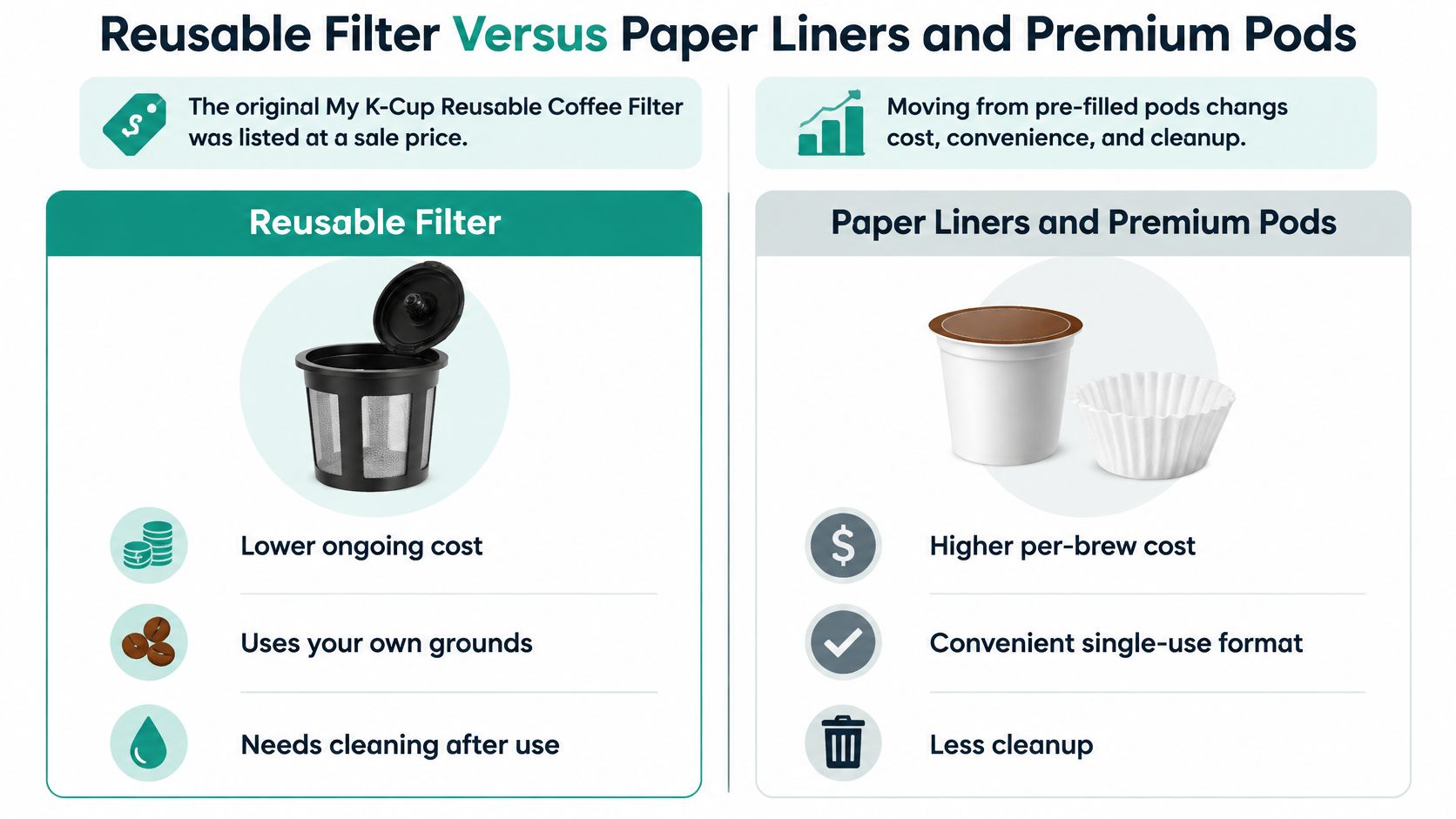
For frequent brewing, a reusable filter avoids buying a liner for every cup, while liners can make cleanup simpler. Choose based on your weekly brewing routine and whether your brewer supports the filter you plan to use.
Pick the Right Filter for Your Keurig
Start with the exact brewer family, then confirm whether the model needs a dedicated adapter. Only after that check should you choose the filter. This order helps you avoid buying a basket that looks right but doesn't align with the brewer's lid or holder.
For K-Supreme, K-Slim, and K-Duo Gen 2 owners, PureHQ's universal refillable reusable K-Cups come in a four-pack priced at $19.95 and are listed as compatible with those models. If you prefer liners, its 100-pack of disposable paper filters for reusable K-Cups is $12.95 and fits Keurig and Ninja DualBrew coffee makers.
For maintenance, PureHQ's Keurig and Breville descaling and cleaning tablets come in a 24-count pack with six compatible water filters for $19.95. That gives you a matching maintenance option for the brewer's separate cleaning needs.
Confirm your model, choose the matching filter, and shop the PureHQ reusable K-Cup range.
PureHQ Inc. offers reusable K-Cup filters, paper liners, compatible water filters, and descaling and cleaning products for home and small-workplace coffee setups. Match the filter to your Keurig model, then visit PureHQ Inc. to shop the reusable filter and maintenance options that fit your routine.

