
Coffee Machine Care
Keurig 2.0 Carafe: Multi-Cup Brewing & Options
May
You bought a Keurig because you wanted coffee fast. Then family stayed over, a couple of coworkers dropped by, or you just wanted more than one mug without standing at the machine repeating the same routine.
That's when the Keurig 2.0 carafe starts to feel weirdly unfinished. The slot is there. The menu hints at bigger brews. But the machine asks for a specific pod, refuses to recognize the carafe at the worst time, or throws you back into single-cup mode. A feature that should save time ends up feeling like a locked door.
The good news is that the carafe option on a Keurig 2.0 isn't useless. It's just picky. Once you understand how the system was designed, what triggers the brew cycle, and where recognition usually fails, it gets much easier to decide whether to keep using it, troubleshoot it, or work around its limits.
Why Your Keurig 2.0 Has a Carafe Option You Never Use
Individuals often ignore the carafe option until they need it. One person wants coffee right now, another wants a cup five minutes later, and suddenly your “convenient” brewer turns into a small assembly line on the counter.
Single-serve brewing is great until you need several cups in a row. Then every extra cycle feels slower than it should. You're swapping pods, waiting on brew time, and trying to keep the first cup warm while the last one finishes. That's exactly the problem the Keurig 2.0 carafe feature was supposed to solve.
The frustration is real
The issue isn't that the idea is bad. The issue is that the carafe option often feels hidden behind too many conditions.
You need the right pack. The carafe has to sit correctly. The brewer has to agree that everything is in place. If any one part is off, the machine won't behave like a flexible coffee maker. It behaves like a machine that wants exact compliance.
The carafe feature frustrates people because it looks simple from the outside, but the machine treats it as a separate brew system.
That mismatch throws a lot of owners off. They assume the carafe is just a larger container under the same brewer logic. It isn't. The Keurig 2.0 handles it more like a different mode with its own rules.
Why people give up on it
A lot of owners stop using the carafe option for practical reasons:
- It feels inconsistent: Sometimes the menu appears, sometimes it doesn't.
- It interrupts the point of convenience: Brewing back-to-back cups can feel easier than troubleshooting detection.
- It raises compatibility questions: Special packs and brewer recognition make the system feel more restrictive than expected.
If that sounds familiar, you're not using the carafe less because you're missing something obvious. You're reacting to a system that added convenience for multi-cup brewing, but only if every part lines up correctly.
What actually helps
The carafe feature makes more sense once you stop treating it like an oversized single-cup brew. It works better when you treat it as its own process, with its own inputs and failure points.
That's also why random trial and error rarely fixes the problem. You need to know what the machine is checking, what the carafe mode expects, and which issues are usually mechanical rather than electrical.
Understanding the Keurig 2.0 Carafe System
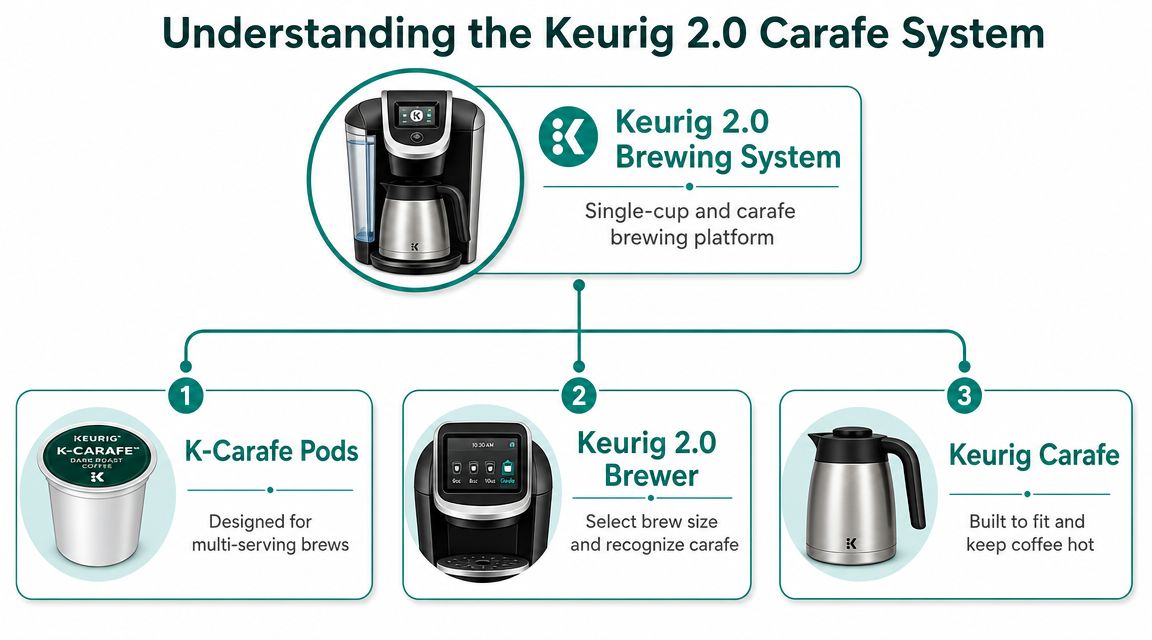
The Keurig 2.0 carafe wasn't a side accessory bolted onto an older single-serve idea. It was built into the platform itself. According to this overview of the Keurig 2.0 lineup, the system introduced a K-Carafe format designed to brew up to 30 ounces, using packs with up to 26 grams of fresh coffee, for roughly four cups in one cycle. The same overview notes that the K550 was marketed with “Keurig 2.0 Brewing Technology” that reads each pack's lid before brewing, and that premium K300, K400, and K500 series brewers were positioned from $149 to $199 with larger reservoirs and touch displays to support batch brewing.
The lid works like a key
The easiest way to understand the system is to think of the pod lid as a key. The brewer reads that lid and decides which door to open.
A regular K-Cup opens the single-cup options. A compatible carafe pack opens the carafe brew program. If the machine doesn't read the right lid format, it won't offer the larger brew cycle, even if the carafe is physically sitting there.
That design matters because the brewer's function extends beyond pushing more water through a bigger pod chamber. It's checking for compatibility first, then allowing the brew path meant for the carafe workflow.
Which machines were built around it
Carafe capability showed up in the more premium 2.0 range, not as a bargain extra. These models were sold as brewers for both solo cups and multi-cup occasions.
A quick snapshot looks like this:
| Model group | What stood out |
|---|---|
| K300 series | Entry point into the premium 2.0 range with carafe-oriented features |
| K400 series | Touch display and larger-capacity setup for more frequent use |
| K500 series | Higher-end version with a larger water setup and upgraded display feel |
| K550 | Included a carafe, starter water filter kit, and a 2.8-inch color touch display |
The larger reservoirs weren't there by accident. A machine meant to brew a carafe needs to avoid constant refilling, especially if it's also handling single cups through the day.
Practical rule: If your brewer supports a carafe, treat it like a dual-purpose platform, not just a single-serve Keurig with a bigger pot.
What the system was trying to do
Keurig was trying to cover both use cases in one machine. Brew one mug before work. Brew several cups when people are over. On paper, that's a smart move.
In practice, the pack-reading system made the experience more controlled than many buyers expected. That's the trade-off at the heart of the Keurig 2.0 carafe story.
How to Brew a Full Pot with Your Keurig 2.0
The fastest way to get a carafe brew working is to stop improvising. A Keurig 2.0 usually responds well when you set up the machine in the right order.
Using official carafe packs
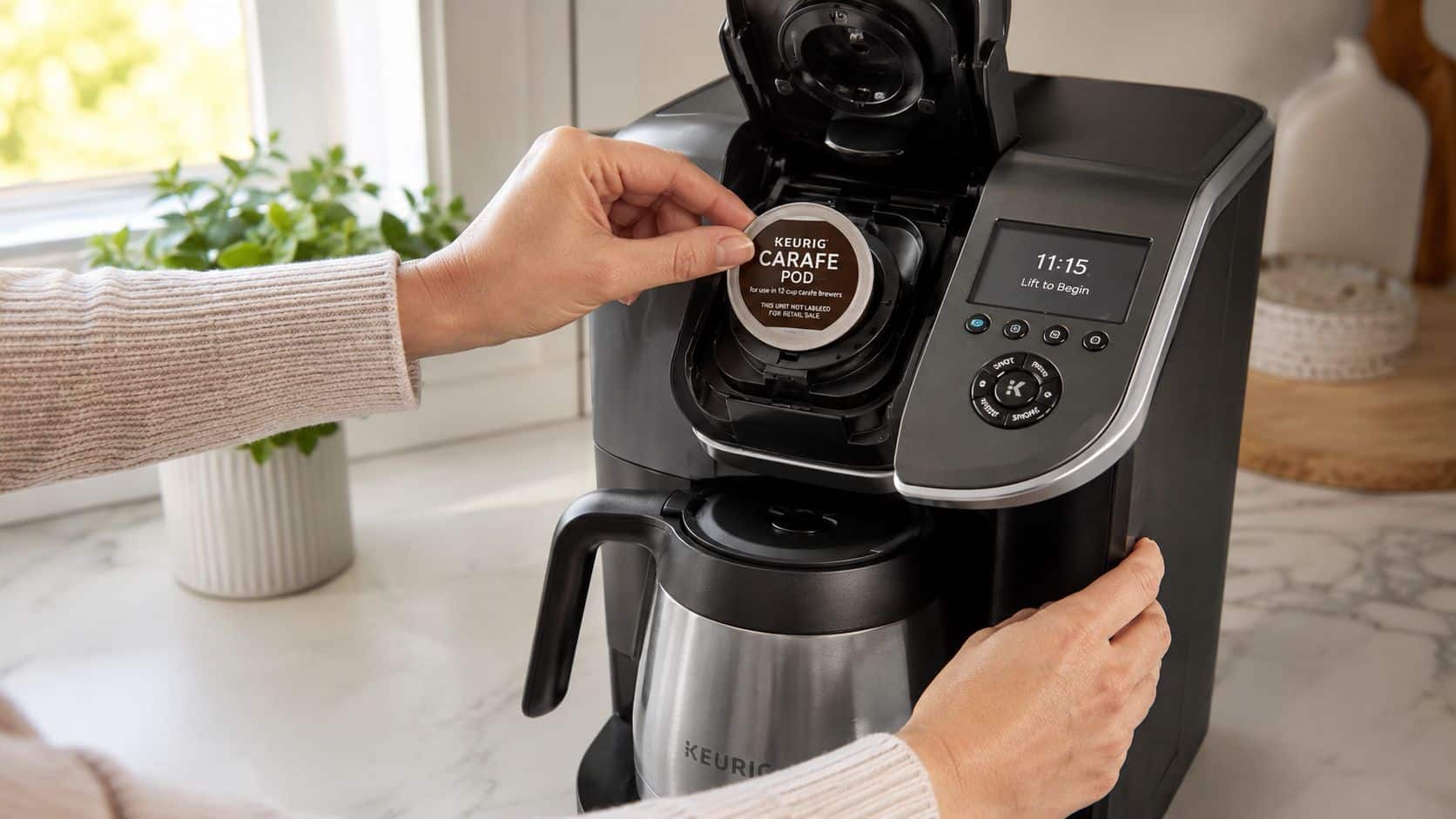
Keurig's own system relies on pack authentication. As Staples' Keurig 2.0 product information explains, the brewer reads the lid of each K-Carafe pack and only enables carafe brewing when it detects the correct format.
That means the setup order matters.
- Fill the reservoir fully. If the machine is low on water, carafe mode may not become available or may stop mid-process.
- Seat the carafe squarely on the base. Don't leave it slightly forward or crooked.
- Insert a compatible K-Carafe pack. Close the brewer head firmly so the machine can read the lid.
- Wait for the menu to respond. If the brewer recognizes the pack, the carafe brew option should appear.
- Start the brew and leave the carafe in place. Moving it early can interrupt the cycle.
If the menu doesn't switch over, don't keep jamming the pod in and out. That usually means the machine didn't complete one of its checks.
Using a reusable basket instead
A lot of owners eventually want more flexibility than official packs allow. That's where reusable options come in. If you want a broader look at how reusable Keurig brewing works for both cup and carafe use, this guide to reusable Keurig brewing for cup and carafe setups is a useful reference.
Reusable baskets change the day-to-day experience in a few important ways:
- You choose the coffee: That matters if you already have a ground coffee you like.
- You control strength: Add more or less coffee based on taste.
- You avoid the locked-pack feeling: You're not relying on a shrinking proprietary format.
What works better in real kitchens
Official packs are simpler when everything is compatible and recognized on the first try. Reusable baskets are better when you care more about coffee choice, less waste, and long-term flexibility.
The catch is technique. Reusable brewing tends to go wrong when people overfill the basket, use the wrong grind, or expect the machine to compensate for bad prep.
A good reusable setup needs a sensible fill level, a grind that isn't too powdery, and a quick rinse after brewing. Do that, and the process gets a lot less fussy.
Here's a visual walkthrough if you prefer to watch the workflow in action:
Fixing Common Keurig 2.0 Carafe Problems
Most Keurig 2.0 carafe failures aren't mysterious. They feel mysterious because the machine doesn't explain what it's checking.
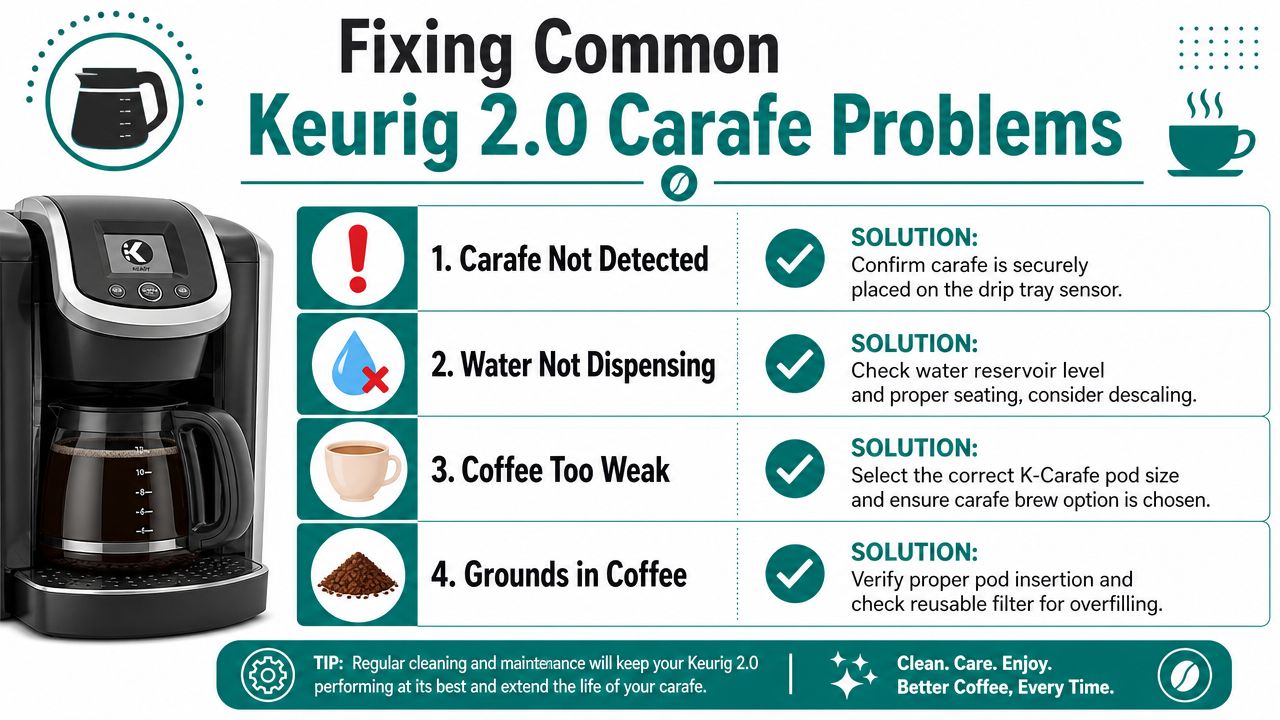
The most common recognition problems come down to alignment and sensor interaction, not a “bad carafe.” In user Q&A discussing the Keurig 2.0 coffee carafe, the repeated trouble points are the carafe not sitting squarely, the reservoir not being completely full, and issues around the pack-reading area.
When the machine won't detect the carafe
Start with the obvious, but do it in the right order.
- Check the carafe position: Set it down again so it sits flat and centered on the drip tray area.
- Top off the reservoir: “Almost full” may still not be enough for the machine to approve a larger brew.
- Open and inspect the pod area: Look for residue where the brewer reads the pack lid.
- Try one clean restart: Power the machine down, reseat everything, and start over once.
If the brewer doesn't recognize the setup, the problem is often the machine's checks, not the glass or plastic carafe itself.
If you keep getting the same error after that, stop repeating random attempts. Repetition doesn't help much when the failure is happening at the same sensor checkpoint every time.
Weak coffee and messy brews
Carafe users also run into taste problems. The brewer works, but the coffee tastes thin, or grounds end up in the pot.
That usually points to process, not the carafe body.
| Problem | Likely cause | What to do |
|---|---|---|
| Weak coffee | Too little coffee or an unsuitable grind in a reusable basket | Adjust the fill and use a grind that isn't overly coarse |
| Grounds in the pot | Overfilled reusable basket or poor seating | Reduce fill level and make sure the basket sits correctly |
| Slow or uneven flow | Internal scale buildup | Clean and descale the brewer |
| Carafe mode missing | Recognition issue with setup | Recheck water, alignment, and pack-reading area |
If your brews have become weaker over time, scale buildup is worth addressing. A Keurig that needs cleaning often loses consistency before it fails outright. This step-by-step descaling guide for Keurig brewers is useful if you're trying to restore flow and taste.
A troubleshooting sequence that saves time
Use this order and you'll avoid most dead ends:
- Reset the setup, not just the menu.
- Refill the reservoir completely.
- Reseat the carafe carefully.
- Inspect the pod-reading area.
- Run cleaning or descaling if taste and flow have both slipped.
That order matters because it separates recognition failures from brewing-quality problems. If the machine can't detect the setup, cleaning up your coffee recipe won't fix anything. If the machine does detect the setup but the brew tastes off, that's when grind, fill, and maintenance become the actual suspects.
Official K-Carafe Pods vs Reusable Baskets
The Keurig 2.0 carafe system was built for batch brewing, not just oversized single-cup output. In this overview of the K400 and K500 generation, the K400 is shown with a 70 oz reservoir and the K500 with an 80 oz reservoir, and both were marketed with a starter carafe and K-Carafe packs. That tells you what Keurig had in mind. Less refilling, more multi-cup use.
The bigger question today isn't whether carafe brewing works. It's whether official K-Carafe pods still make sense compared with a reusable basket.
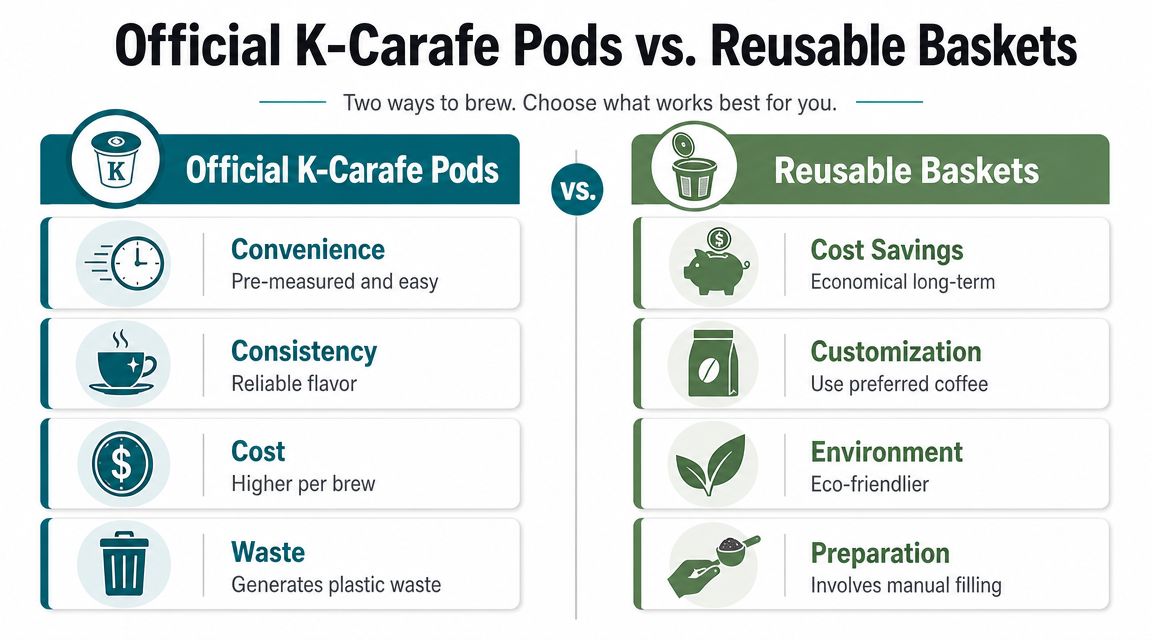
Side-by-side trade-offs
Official pods still have one clear advantage. They're convenient when you want a pre-measured brew with minimal prep.
Reusable baskets win in flexibility. You can use the coffee you already buy, adjust the taste, and avoid being locked into a specific pod format. If you want a broader look at reusable Keurig options, this overview of reusable K-Cups and compatible brewing options is a helpful place to compare approaches.
Here's the straight comparison.
| Feature | Official K-Carafe Pods | PureHQ Reusable Carafe Basket |
|---|---|---|
| Setup speed | Fast. Insert and brew if recognized | Slightly slower because you fill it yourself |
| Coffee choice | Limited to compatible pod options | Use your preferred ground coffee |
| System compatibility | Tied to Keurig's recognition logic | Depends on using the correct reusable accessory |
| Waste | More packaging after each brew | Less single-use waste over time |
| Flavor control | Fixed by the pod | Adjustable by grind and amount |
| Learning curve | Easy when the machine recognizes the pod | Requires a little dialing in |
Answering the biggest objection
A lot of people assume reusable filters make weak or messy coffee. That happens, but usually because the setup is off.
Worth remembering: Reusable brewing doesn't fail because it's reusable. It fails when the basket is overfilled, the grind is wrong, or the user expects pod-level simplicity without any adjustment.
If you use too fine a grind, you can get sludge or slow flow. If you use too little coffee, the pot tastes flat. If you overfill the basket, you may get overflow or grounds sneaking through. None of that means the format is flawed. It means it needs a normal brewing routine, just like any drip-style coffee setup.
What works for different buyers
Choose official pods if you want the least prep and you still have reliable access to compatible carafe packs.
Choose a reusable basket if you care more about freedom, less waste, and making the machine fit your coffee habits instead of the other way around.
For many existing 2.0 owners, that second path is the more practical one now. Not because the original pod system was a bad idea, but because proprietary ecosystems age faster than basic brew hardware.
Is the Keurig 2.0 Carafe Still a Good Choice in 2026
If you already own a Keurig 2.0, the answer is yes, with conditions.
The platform is older, and support attention has shifted. As noted in this FAQ discussion about Keurig 2.0 relevance and newer K-Duo focus, many owners are now weighing the older compatibility model against newer Keurig systems that put more emphasis on dual-brew flexibility. That matters if you're buying into the format from scratch.
When it still makes sense
A Keurig 2.0 carafe setup is still worth using if these points describe you:
- You already own the brewer: Replacing a working machine just to escape one compatibility quirk often isn't necessary.
- You want multi-cup capability occasionally: The carafe function still fills a real gap between single cups and a separate drip machine.
- You're willing to use accessories strategically: A reusable basket, fresh water filtration, and regular descaling can make an older brewer much more practical.
When it doesn't
It's a weaker choice if you're shopping fresh and want the simplest long-term ecosystem. Newer dual-brew machines make more sense for buyers who don't want to think about pod recognition logic or older-format accessories.
That said, plenty of Keurig 2.0 owners don't need a new machine. They need their current one to work with less friction. In that situation, upgrading the brewing setup is usually smarter than replacing the brewer outright.
If you want to get more life out of your current machine, shop compatible carafe accessories, reusable filters, and maintenance supplies from PureHQ Inc..

