
Coffee Machine Care
Keurig Essentials Water Filter Replacement Guide
Oct
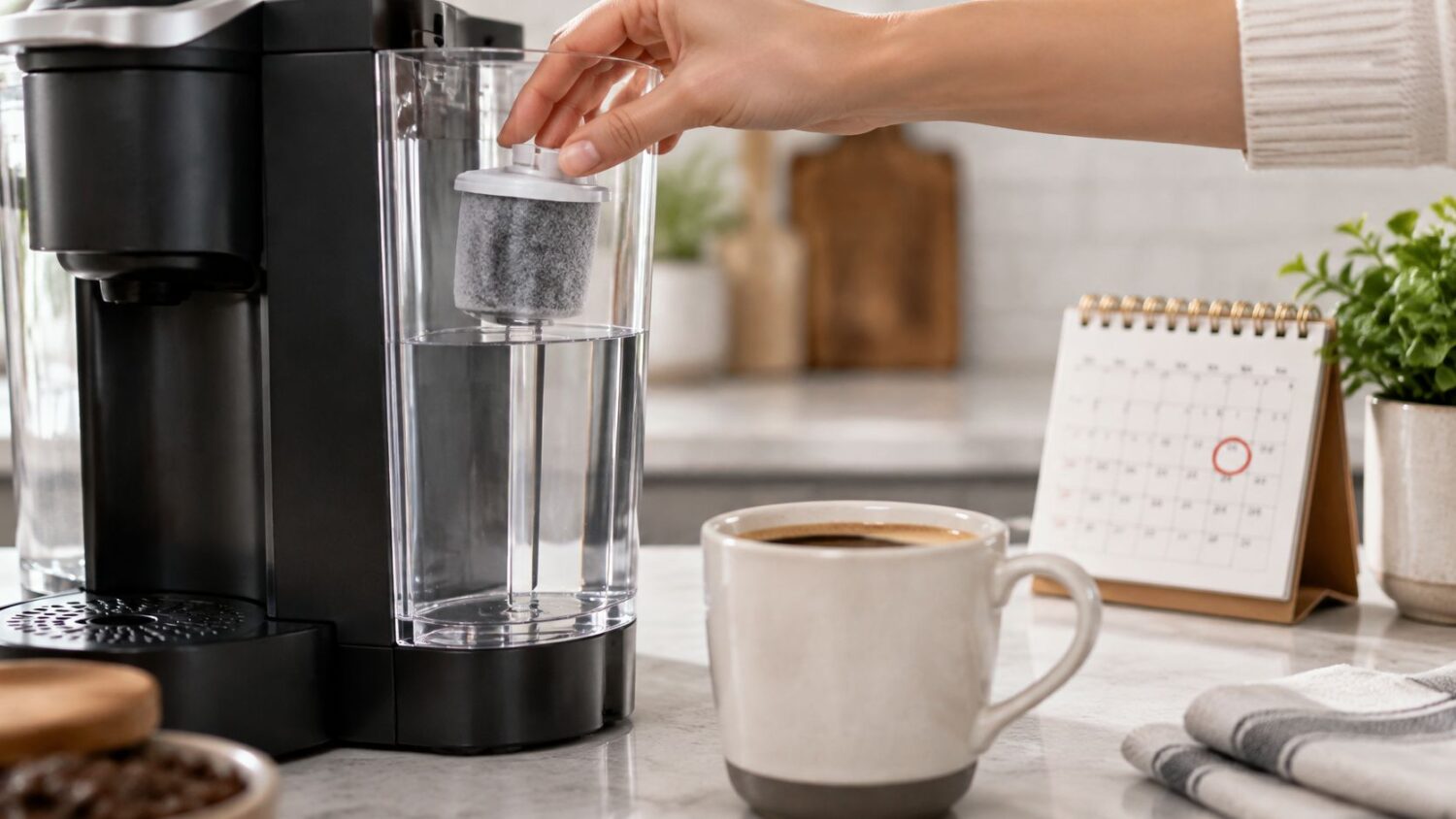
Keurig's rule is to replace the Essentials water-filter cartridge every 2 months or 60 reservoir refills, whichever comes first. If your cup tastes flat or your brewer shows a descale alert, remember that the cartridge and descaling follow separate maintenance clocks.
You might be standing at the counter with a metallic-tasting cup, wondering whether the tap water, an old cartridge, or the brewer itself is to blame. The answer starts with tracking how often you refill the reservoir, then treating filtration and descaling as different jobs.
When to Replace a Keurig Essentials Water Filter
If you brew several cups a day, the reservoir may reach its refill limit well before two months. Keurig's water-filter instructions recommend replacing the cartridge every 2 months or 60 reservoir refills, whichever comes first.
| Trigger | Limit | What to do |
|---|---|---|
| Calendar use | 2 months | Replace the cartridge even if you have refilled the reservoir fewer than 60 times. |
| Reservoir use | 60 refills | Replace it sooner if frequent brewing gets you to this limit first. |
| Taste or particles return | Chlorine taste, odor, or visible bits | Check the cartridge and replace it if needed. |
| Mineral scale | Every 3 months or when the descale notice appears | Remove the filter before descaling the brewer. |
The cartridge and descaling follow separate clocks. The cartridge handles incoming water; descaling addresses minerals already inside the brewer. When it is time to descale, take the cartridge out first, then follow your brewer's descaling instructions.
Write the installation date on the filter holder to keep track of the calendar interval. Some Keurig models display a water-filter reminder after 1,000 ounces or 2 months, as described in the Keurig K475 use-and-care guide. Use the reminder as a prompt to check your schedule and cartridge. For a broader perspective on replacement timing, see cartridge replacement advice from Ring Hot Water.
Choose the limit you are likely to reach first, then mark that replacement date on your calendar.
How Activated Carbon Changes Brew Water
Think of activated carbon as a sponge for certain dissolved tastes, not a sieve that blocks every mineral. Water passes through the cartridge, where some material can adhere to the carbon's surface or pores.
The National Sanitation Foundation's explanation of water-treatment standards describes adsorption and filtration as processes in which dissolved or suspended material adheres to an adsorbent medium, such as carbon. NSF/ANSI Standard 42 covers aesthetic impurities such as chlorine, taste, and odor; Standard 53 addresses contaminants associated with health effects. NSF cautions that certification to a standard doesn't mean a filter reduces every possible contaminant.
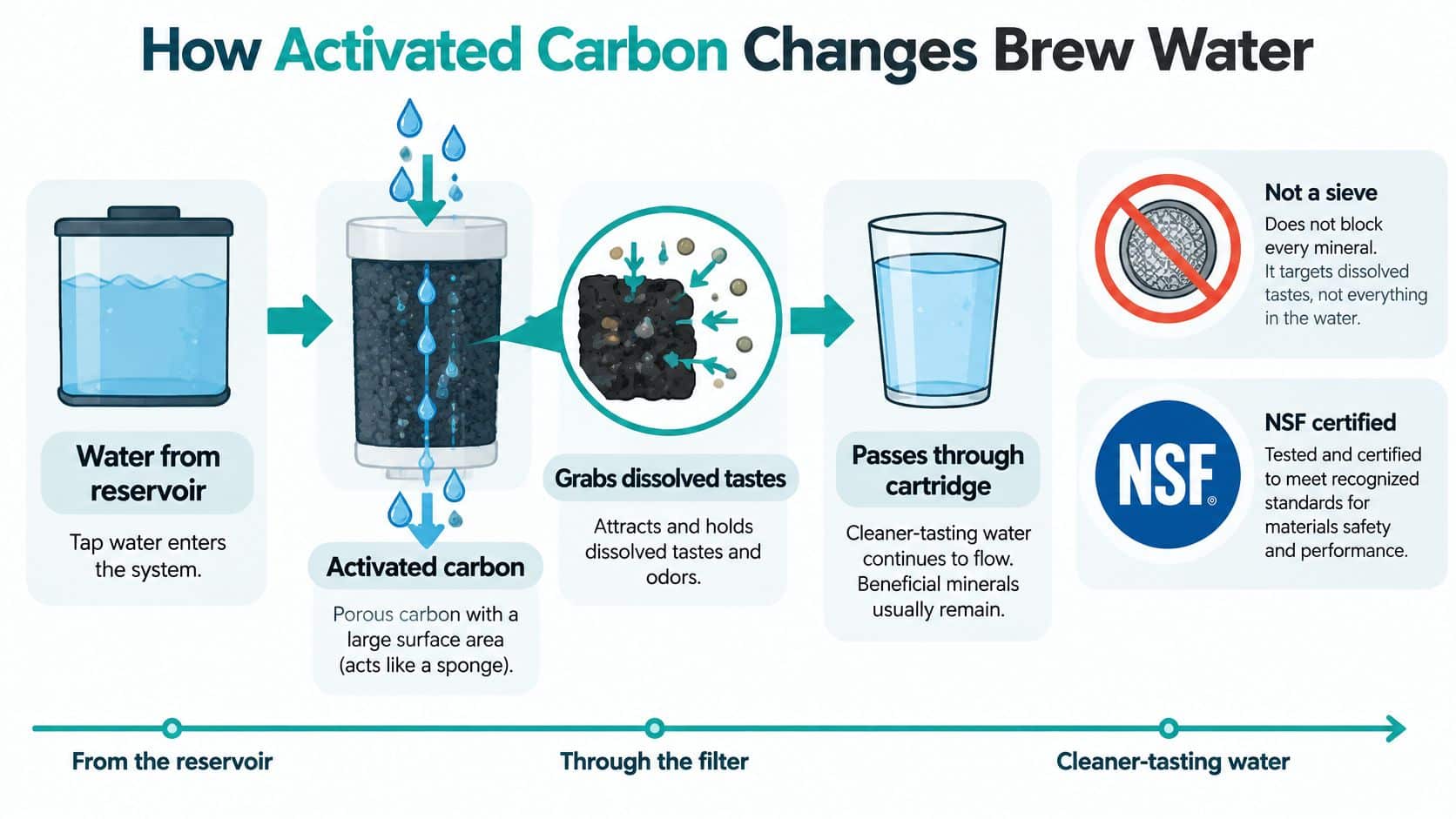
Keurig's care language is narrower: its filter helps keep water fresh and remove impurities, but the cited guidance doesn't publish a universal removal percentage. Local tap-water quality and the exact cartridge design affect what filtration can achieve. So chlorine-related off-tastes are a reasonable reason to try a suitable cartridge, but a promise of broad health protection needs specific evidence.
Expect support for fresher-tasting brew water, not whole-house purification.
When you compare cartridges, check documented brewer compatibility, the replacement interval, materials, and any named certification. A slogan about removing harmful pollutants isn't a substitute for knowing which standard applies or what a manufacturer claims.
How to Fit and Install the Cartridge
The cartridge is not built into every brewer. Keurig's K-Duo Essentials Gen 2 use-and-care guide treats the reservoir filter as an optional accessory installed using the separate Water Filter Starter Kit instructions. K-Express Essentials and other compatible Essentials systems use Keurig's stated replacement schedule. The K-Café Essentials use-and-care guide describes preparing the cartridge before installation.
| Brewer | Filter use | Source of guidance |
|---|---|---|
| K-Duo Essentials Gen 2 | Optional reservoir accessory | Water Filter Starter Kit instructions |
| K-Express Essentials | Replace every 2 months or 60 refills | Keurig water-filter maintenance guidance |
| K-Café Essentials | Reservoir cartridge, prepared with a soak and rinse | Use-and-care prep rinse guidance |
| Step | What to do |
|---|---|
| 1 | Soak the cartridge for about 5 minutes. |
| 2 | Rinse it for about 60 seconds to flush out carbon fines. |
| 3 | Rinse the holder and retaining clip. |
| 4 | Seat the cartridge and clip, then check that the reservoir sits flat. |
| 5 | Mark the replacement date on the holder. |
| 6 | If your model has a water-filter reminder, reset it after the swap. |
Skipping the soak and rinse can leave black particles or a brief off-taste in the first cups. Keurig's prep guidance recommends the rinse to clear trapped carbon fines, and says to replace the cartridge sooner if chlorine taste, odor, or visible particles return.
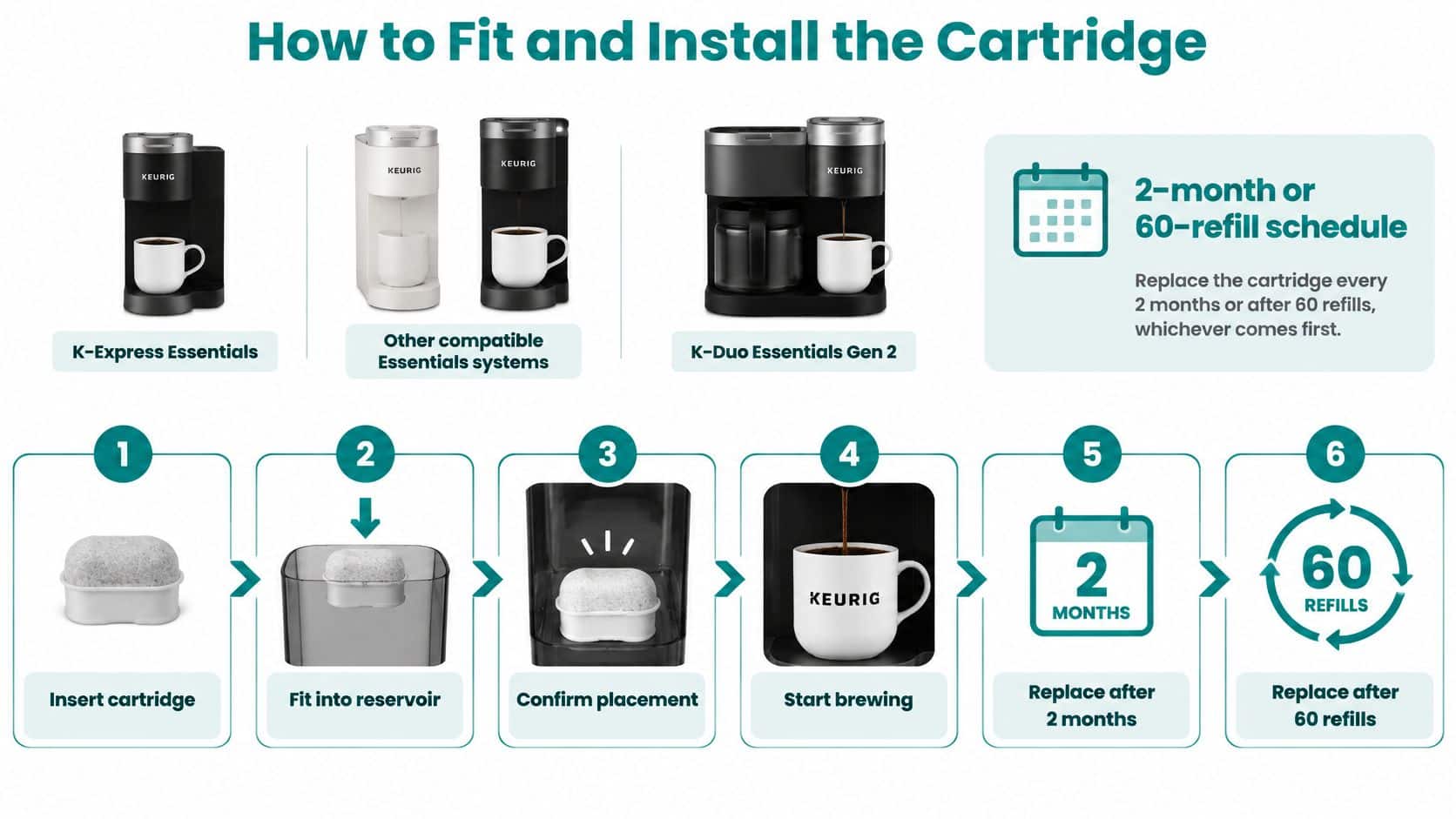
Keurig also instructs owners to remove the reservoir filter before cleaning, so cleaning chemicals or descaling solution don't exhaust or contaminate the carbon. If the handle, clip, or reservoir lid won't seat properly, stop and match the holder style to your brewer instead of forcing it. For illustrated guidance, see this water-filter installation guide.
Premium Cartridges Against Generic Alternatives
| Option | Stated interval | Claim to trust | Fit check | Limit |
|---|---|---|---|---|
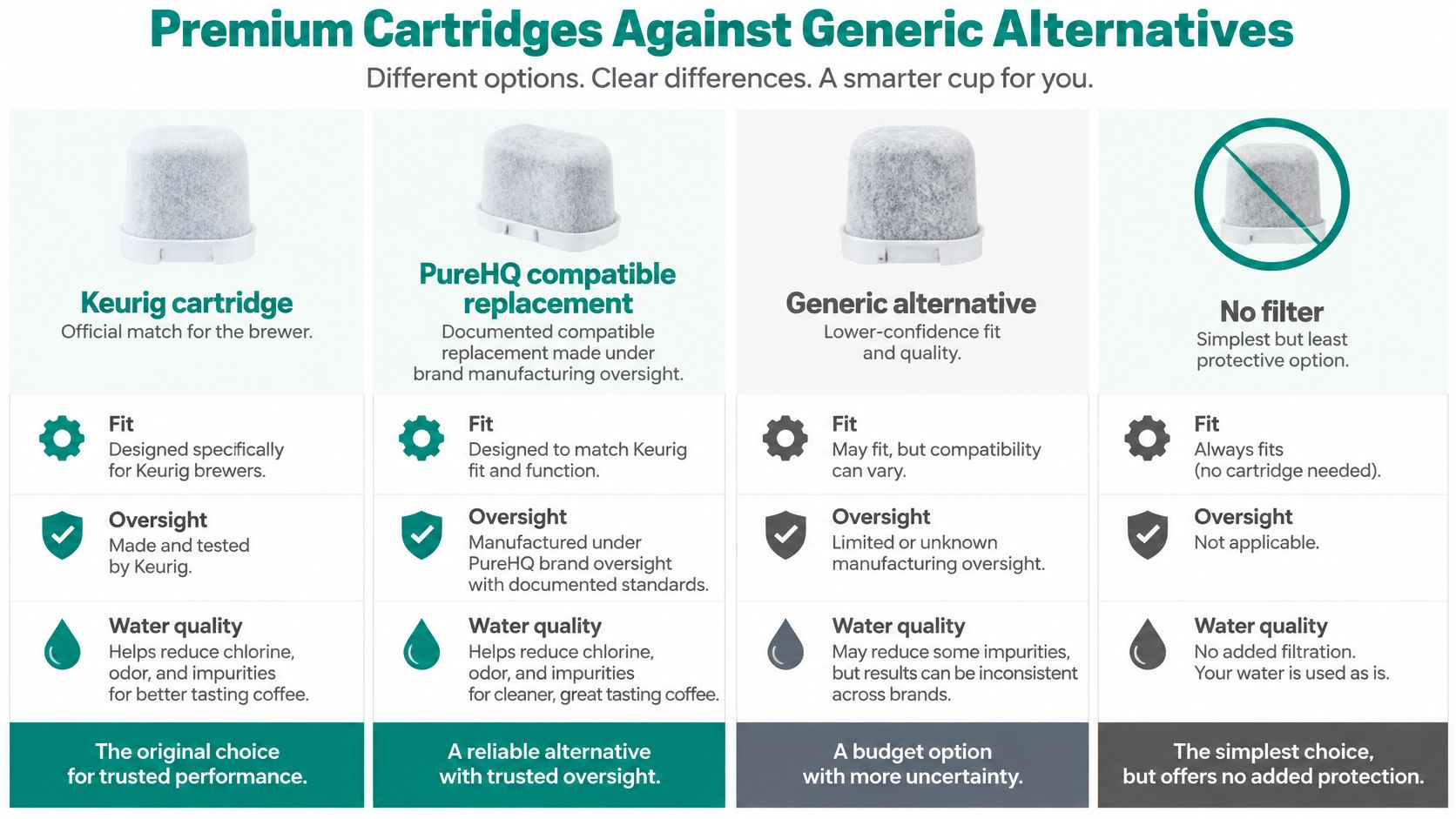
| Keurig cartridge | 2 months or 60 refills | Keeps water fresh and helps remove impurities; no universal removal percentage | Official holder and clip | Doesn't descale the brewer |
| Documented compatible replacement | Same 2-month or 60-refill clock | Materials, fit, and any named NSF/ANSI standard | Reservoir sits flat with the clip seated | Remove it before descaling |
| Vague generic cartridge | Often unlimited or unstated | Broad pollutant language without Standard 42 or 53 scope | Leaks or a loose lid mean stop using it | May shed fines or exhaust early |
| No filter | None | Chlorine taste and odor remain | No cartridge to seat | Minerals can still scale the heater |
A Keurig cartridge is the straightforward option if you want an official holder and clip, with a stated replacement schedule and restrained fresh-water claims. Its role remains limited: it doesn't descale the brewer.
A documented compatible replacement is another choice. PureHQ oversees its own water-filter manufacturing, so assess any compatible cartridge by its stated materials, fit, named standards, and service interval, rather than assuming that a brand name guarantees a longer life.
A generic cartridge with no stated interval or defined certification scope leaves more unanswered. Broad “removes harmful pollutants” language doesn't tell you which contaminants were tested. Before brewing, check for the specific fit problem that concerns many owners: a loose reservoir seat or leak. Stop using a cartridge that won't sit securely.
Brewing without a filter avoids the holder and cartridge altogether, but chlorine-related taste may remain, and hardness minerals can still reach the heater. Choose that route only if it suits your water and you're prepared to maintain the brewer separately.
Durability isn't immortality. An official or premium cartridge still needs replacement, and a credible listing should name both its service interval and compatible Essentials systems. If fit is your concern, match the holder style to the brewer. If a listing won't state an interval, reject it.
What Better Water Does for Taste and the Machine
Chlorine or stale reservoir water can mute a cup even when the coffee itself is fine. Keurig says filtration can help remove water impurities and improve beverage taste, but that's only one part of brewer care.
Think of maintenance as three separate jobs. A cartridge supports incoming-water quality. Descaling targets mineral deposits inside the brewer. A rinse pod cleans residue and oils from the needles and pod holder. Keurig's maintenance guidance for the K-Iced Plus distinguishes filter replacement from descaling and lists weekly rinse-pod use for the brew path.
A fresh cartridge may improve the taste of a single morning cup. In a small office where people refill the reservoir all day, a cartridge alone won't address scale building up in the heater and flow path. The K-Duo Essentials Gen 2 guide also describes the filter as optional and directs owners to remove it before reservoir cleaning. Hardness minerals can still accumulate even when a carbon cartridge is in use.
If a new cartridge doesn't fix slow brewing or a descale alert, check for scale or residue before replacing another filter.
Keep a compatible descaling solution beside the cartridge for mineral buildup. Cleaning tablets can address residue and oils that the cartridge doesn't handle. If you're investigating why a fresh filter changed your cup, this guide to water filters and coffee taste offers additional context.
Keep the jobs distinct: replace the cartridge on its own clock, descale on the second, and clean the needles and pod holder on their own schedule.
Black Specks Leaks and a Descale Light
A brand-new filter can seem to make coffee worse, or the orange descale light can stay on after you install one. Match the symptom to its likely cause before buying another cartridge.
| Symptom | Likely cause | Action |
|---|---|---|
| Black bits or a brief off taste | Carbon fines from a dry cartridge | Soak 5 minutes, rinse 60 seconds, and rinse the holder and clip. |
| Leak or reservoir won't seat | Wrong handle or clip not locked | Reseat it; don't force a mismatched cartridge. |
| Descale light or slow brew | Minerals inside the brewer | Remove the filter, descale, then reinstall it. |
| Chlorine taste before 2 months | 60 refills or a heavy water load | Replace the cartridge early. |
The K-Duo Essentials Gen 2 use-and-care guide describes filtration as a way to help remove impurities and improve beverage taste, not as a cure for mineral buildup. It also directs owners to remove the reservoir filter before cleaning. If black specks continue after preparing the cartridge, brew and discard a plain-water cycle.
For leaks, check the clip and confirm that the holder matches the brewer. If the reservoir still won't sit flat, stop rather than forcing the lid or handle. That's a fit problem, not a water-quality problem.
A descale light or slow brew after a fresh cartridge points to mineral buildup. Remove the filter before running the brewer's descaling procedure, then reinstall a fresh cartridge once the reservoir has been rinsed. On models with a filter reminder, reset it after maintenance so an old notice doesn't look like a cartridge failure. For help interpreting the warning, see this guide to turning off a Keurig descale light.
Use another cartridge when taste, odor, or fines suggest the filter is due. Don't expect a new one to solve scale.
Shop the Filter and the Matching Care Kit
Use a cartridge that names Essentials compatibility. Replace it at the earlier of the calendar or refill limit. Descale separately, with the filter removed.
PureHQ's Keurig & Breville Descaling and Cleaning Tablets come in a 24-count pack with 6 compatible water filters for $19.95. The bundle lets you stock filter replacements alongside cleaning tablets. If you already have filters and only need to address mineral buildup, PureHQ's Coffee Machine Descaler provides 10 uses, is made in the USA, and is formulated as a universal descaling solution for Keurig, Nespresso, Breville, and espresso machines. It's $23.95.
A customer who uses spring water in a Keurig said the replacement worked as described and that they didn't need to change filters as often. Still, spring water doesn't cancel the brewer's maintenance schedule, and it doesn't eliminate the need to descale.
Check current return and warranty terms on the product page before ordering. Once the cartridge goes in, write down its installation date and set the next replacement reminder.
Shop PureHQ's compatible Keurig water filters and the tablet pack to keep incoming-water care and brewer cleaning on separate schedules. Visit PureHQ Inc. to choose the accessories that match your brewer, review current return and warranty details, and set your next filter date when you install the cartridge.

